For landscape architects

Ecological site analysis software that supports your master plan.

Move past generic plant palettes and templated stormwater calcs. EcoDesign's AI agents work against your site's real soil, climate, and topography — producing regenerative master plans, ecological program documents, and AI-rendered visualizations stakeholders can actually understand.

For independent practices, design-build firms, and ecological consultancies
For the ecological intelligence layer

Built to live beside your CAD and GIS, not replace them.

EcoDesign handles what CAD doesn't — the ecological reasoning, species selection, climate analysis, and stakeholder-ready visualization. Bring your construction documents back to your standard tools.

Contour-aware topography

Automatic contour mapping, slope analysis, and sector analysis (sun, wind, fire) feed every downstream design decision — passive solar siting, swale placement, vegetation zoning.

Multi-layer site analysis

Soil, climate, hydrology, vegetation, demographics, indigenous knowledge — each its own validator and AI agent — combined into a coherent site report.

Passive solar building program

7-step wizard, 6-tier constraint priority, algorithmic geometry. Generate climate-responsive building footprints to inform massing studies before you commit to CAD.

AI-rendered visualizations

Gemini 2.5 Flash Image renders for buildings, landscapes, and plant guilds. Six guild visualization presets — including seasonal and plan-view variants.

Fire resilience tooling

Built-in fire risk analysis based on topography, climate, and vegetation — critical for wildland-urban interface projects.

Shared project viewer

Send clients a read-only link to your project — no signup required on their end. Faster review cycles, fewer "can you email me a PDF?" loops.

Visualization that closes consultations

Show clients the future of the site, not just the plant list.

Generic plant palettes don't sell a regenerative master plan. EcoDesign's AI-rendered visualizations — buildings, landscapes, and seasonal plant guilds — let you walk a client through what their land will look like at year 1, year 3, and maturity. They argue for the design while you focus on the conversation.

  • Climate-zone-correct rendering (no tropical species in temperate views)
  • Seasonal variants — spring, autumn, plan view
  • Carousel + lightbox presentation built in
  • Exportable for proposals, board presentations, planning applications
Defensible recommendations

Every choice tied to data, not vibes.

When the planning officer or board chair asks "why these species?" or "why this orientation?", you have an audit trail. Every flora suggestion is scored against your site's soil drainage, temperature range, rainfall, pH, and drought tolerance. Every floor plan is validated by Shapely geometry, not eyeballed.

  • SoilGrids ISRIC baseline + your survey data
  • Open-Meteo climate, multi-depth soil profiles, water-table depths
  • Suitability scores you can quote in your design statement
  • Outputs in metric SI units throughout
Project Map

An audit trail for the ecological layer.

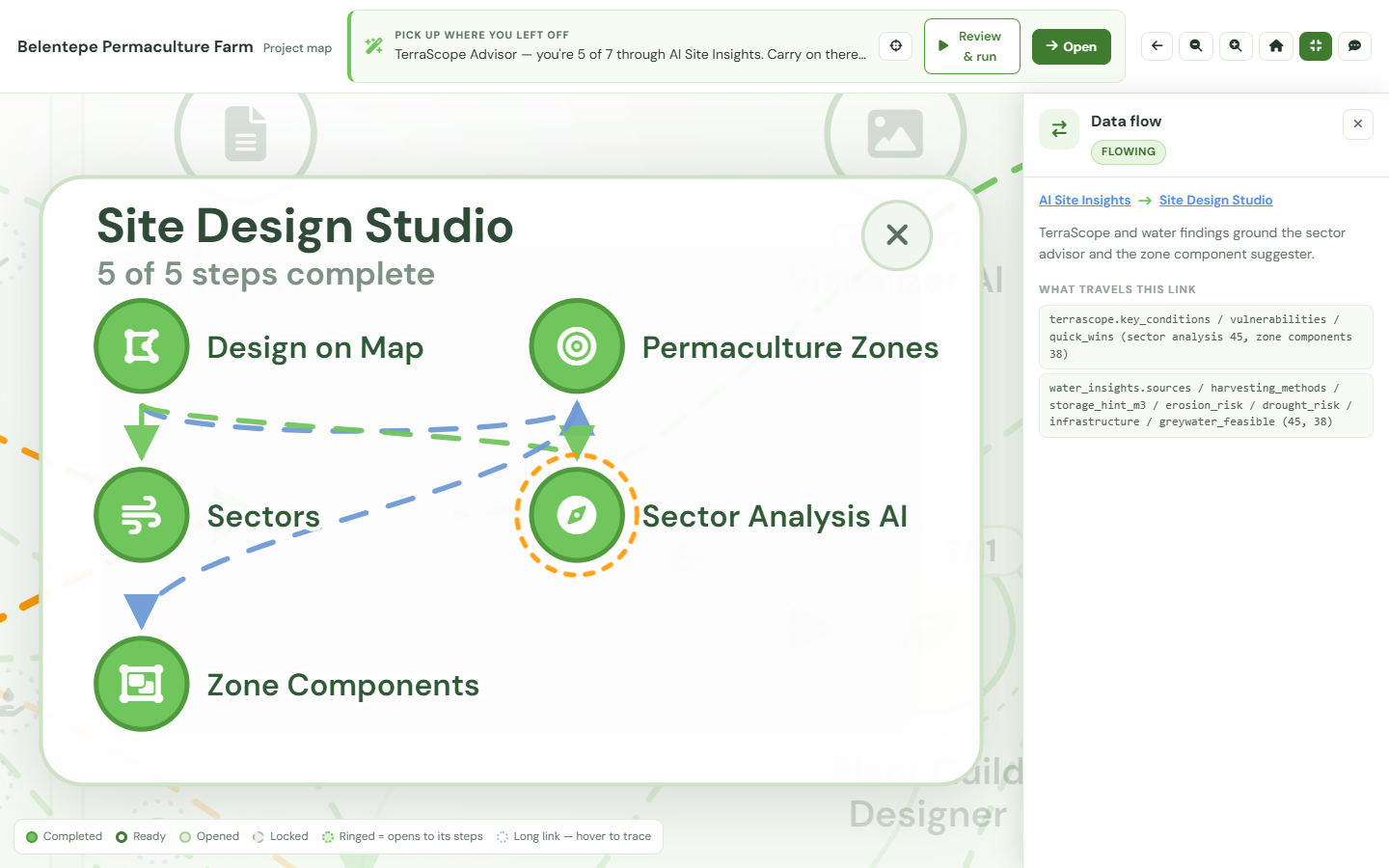
The lines between steps on the Project Map are not decoration — they are the data moving through your project. Select one and the map names what it carries: which findings ground which recommendation, and the fields that travelled between them. For a design statement or a planning submission, that is the difference between asserting your ecological reasoning and being able to walk a reviewer back through it, step by step, to the survey and climate data it started from.

Every stage is drawn from the first free project, locked ones included, so the trail is legible end to end before you unlock the design work it documents.
See how the map works →

A selected connection between two steps on a project map, with a panel describing the data it carries from one step to the other
FAQ

Architect questions, answered.

Does EcoDesign integrate with CAD or GIS?
EcoDesign exports PDF, JSON, and image outputs that you can import into CAD or GIS workflows. We are not a CAD replacement — we complement it with the ecological intelligence layer: site analysis, species recommendations, climate-aware planning, and AI-rendered visualizations.
Can I use EcoDesign for master planning?
Yes. The Research Hub, Project Settings, and Site Design tools support master-plan-scale workflows: contour mapping, sector analysis (sun, wind, fire), water systems, vegetation zoning, and ecological program planning across multi-hectare sites.
Is the output suitable for stakeholder presentations?
Yes. AI-rendered visualizations (Gemini 2.5 Flash Image), seasonal plant guild views, and exportable PDF reports are designed for client and stakeholder presentations. They turn ecological reasoning into visuals that non-specialists can understand and advocate for.
Can I collaborate with my team?
Multi-user collaboration is on the roadmap. Today, the Shared Project Viewer lets you share a read-only link of any project with clients or collaborators without requiring them to sign up.
What scale of project does it handle?
From a 400 m² urban courtyard to a 200-hectare regenerative agriculture estate. The same modules work at every scale — what changes is the data resolution, which we pull automatically.
Can I document how a design decision was reached?
Yes. The Project Map draws every step of a project and the data flowing between them. Selecting a connection shows what it carries — which findings ground which recommendation — and each step’s panel keeps its own output and timestamp. It is a read-only view of work already done, which is what makes it usable as an audit trail in a design statement or a planning submission.

Add the ecological intelligence layer to your practice.

Free account with credits to try every module. Bring your CAD; bring your clients. EcoDesign handles the ecology.

Create your free account